🎁New User Welcome Offer: Get 3 Premium Tournament Entries FREE ($5+) and keep everything you win. No deposit required.🎁New User Welcome Offer: Get 3 Premium Tournament Entries FREE ($5+) and keep everything you win. No deposit required.🎁New User Welcome Offer: Get 3 Premium Tournament Entries FREE ($5+) and keep everything you win. No deposit required.🎁New User Welcome Offer: Get 3 Premium Tournament Entries FREE ($5+) and keep everything you win. No deposit required.
Kokomo Desktop makes deposits and withdrawals simple. Add funds with Apple Pay, card, or crypto — including connecting your wallet — and withdraw your winnings the same day with no minimum.
This guide covers both processes step-by-step on desktop browsers.
How to Deposit on Desktop
Step 1: Open Your Wallet
Click the "WALLET" tab in the top navigation bar. This opens your wallet dashboard showing your current balance.
Step 2: Click Deposit
Select the "DEPOSIT" tab. You'll see your balance and the available deposit methods.
Step 3: Choose How to Pay
Kokomo gives you a few ways to add funds (availability varies by region):
Apple Pay — fastest for US players, no crypto needed
Card — Visa/Mastercard, where available in your region
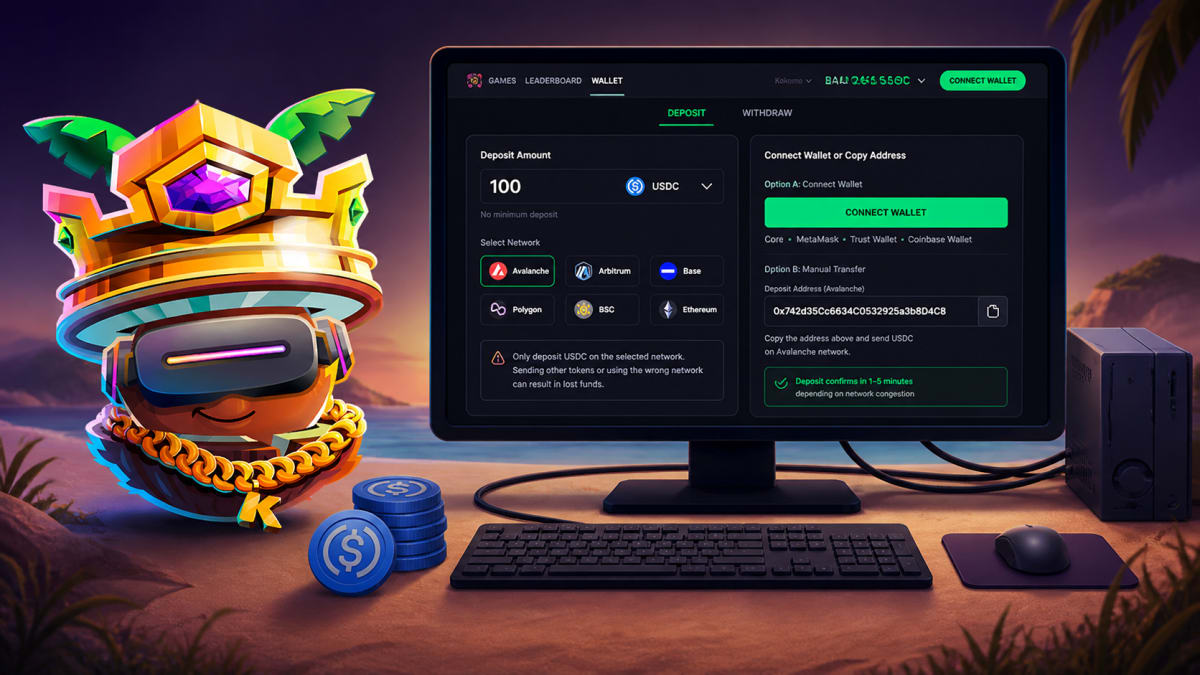
Connect your wallet — on desktop you can connect MetaMask, Core, Trust Wallet or Coinbase Wallet and deposit in a couple of clicks
Send crypto — or just send funds to your deposit address; Kokomo accepts major cryptocurrencies on all major chains
For Apple Pay or card, enter an amount, authenticate, and your balance updates once the payment confirms.
Step 4: Depositing with Crypto (connect or send)
On desktop you have two crypto options:
Option A — Connect your wallet: click Connect Wallet, choose your wallet (MetaMask, Core, Trust Wallet, Coinbase Wallet), and approve the deposit. Funds appear once the transaction confirms on-chain.
Option B — Send manually: copy the deposit address Kokomo shows you, then send funds from any wallet or exchange. Kokomo accepts major cryptocurrencies on all major chains — Avalanche, Base, Arbitrum, Polygon, BSC, Ethereum and more.
Important: double-check the chain and token before sending — using the wrong network can result in lost funds. On desktop you can highlight and paste the address directly, with no risk of typos.
How to Withdraw on Desktop
Step 1: Open Your Wallet
Click the "WALLET" tab, then select the "WITHDRAW" tab.
Step 2: Enter Withdrawal Amount
Type how much USDC you want to withdraw. There's no minimum. (Withdrawals unlock after your first paid match — a standard anti-fraud step.)
Want to put your skills to the test?
Go head-to-head with a real opponent and win real cash
Withdrawals are paid as USDC on Avalanche (AVAX C-Chain) — the fastest, cheapest option. A small transaction fee applies to cover the on-chain gas cost.
Step 4: Enter Your Wallet Address
Paste your receiving wallet address. This is where your USDC will be sent.
Critical: double-check the address. Sending to the wrong address means lost funds — blockchain transactions can't be reversed.
Step 5: Confirm
Click "CONFIRM". Your USDC is sent the same day, typically arriving within minutes depending on network conditions.
Withdrawal Fees and Limits
Fee: a small fixed percentage to cover on-chain gas
Minimum: none
Maximum: none — withdraw your full balance if you want
Speed: same-day, usually within minutes
Network: Avalanche (USDC)
Common Questions
Can I deposit using a card or Apple Pay on desktop?
Yes. US players can use Apple Pay, and card is available in supported regions. On desktop you can also connect a wallet (MetaMask, Core, Trust Wallet, Coinbase Wallet) or send crypto to your deposit address on any major chain.
What happens if I send USDC on the wrong network?
Funds sent on an unsupported network may be lost. Always verify the network before sending.
How long do deposits take?
Card and Apple Pay are instant. Crypto deposits confirm as soon as the transaction finalises — usually 1–5 minutes.
Can I withdraw to a different network than I deposited from?
Withdrawals are paid on Avalanche. If you deposited on another network, you'll still withdraw as USDC on Avalanche.
Do deposits and withdrawals on desktop sync with mobile?
Yes. Your balance is account-based, not device-based.
Tips for Safe Deposits and Withdrawals
Always check the network. Verify the network matches before confirming any crypto transaction.
Copy addresses, don't type them. One wrong character sends funds to the wrong place.
Start with a small test. For your first crypto deposit or withdrawal, send a small amount, confirm it arrives, then do more.
Final Thoughts
Depositing and withdrawing on Kokomo Desktop is straightforward: add funds with Apple Pay, card or crypto, and withdraw your winnings same-day as USDC on Avalanche. No minimums, no delays.
Yes — play Plinko for real money on Kokomo: a casino-style board played head-to-head against one real opponent, not the house. Sign up free, try it, then cash out same-day.
Kokomo Games•
8 min read
Read More →
Ready to Put These Tips to Use?
Join Kokomo Games and start winning real money today